
Cases, screen protectors, chargers, MagSafe/Qi2 pads, cables, and more — frequently updated selections.
View on Amazon →A guide to charging your iPhone 17 Pro as fast and safely as possible. We cover official chargers, third-party picks, and what to watch out for with non-certified / unbranded chargers (including “Chinese-made” knockoffs). The goal: clear, practical advice anyone can follow.
- Fastest wired: Apple’s 40W “Dynamic Power Adapter (60W Max)” or a charger that explicitly supports USB-PD 3.2 with AVS. Real-world target: ~50% in about 20 minutes.
- Older USB-C chargers: Still fine, but many top out around the “old iPhone speed” (~50% in ~30 minutes).
- Wireless: New MagSafe and Qi2.2 pads can reach up to 25W. Older pads work but usually at lower speeds.
- 1) What changed on iPhone 17 Pro?
- 2) USB-PD 3.2 AVS — explained like you’re not an engineer
- 3) Do you need a new charger? (What to expect by charger type)
- 4) If you just want an easy, safe pick
- 5) Cable tips (boring but important)
- 6) How to confirm “AVS support” — and spot risky listings
- 7) Tips for hitting 25W wirelessly
- 8) Everyday safety checks
- 9) Frequently asked questions
- 10) Mini glossary
1) What changed on iPhone 17 Pro?
- Wired: iPhone 17 Pro can negotiate power more precisely using newer USB-PD features (AVS), helping it reach 50% faster when paired with a compatible charger.
- Wireless: MagSafe and Qi2.2 now support up to 25W with compatible pads/stands — noticeably quicker than older 15W setups.
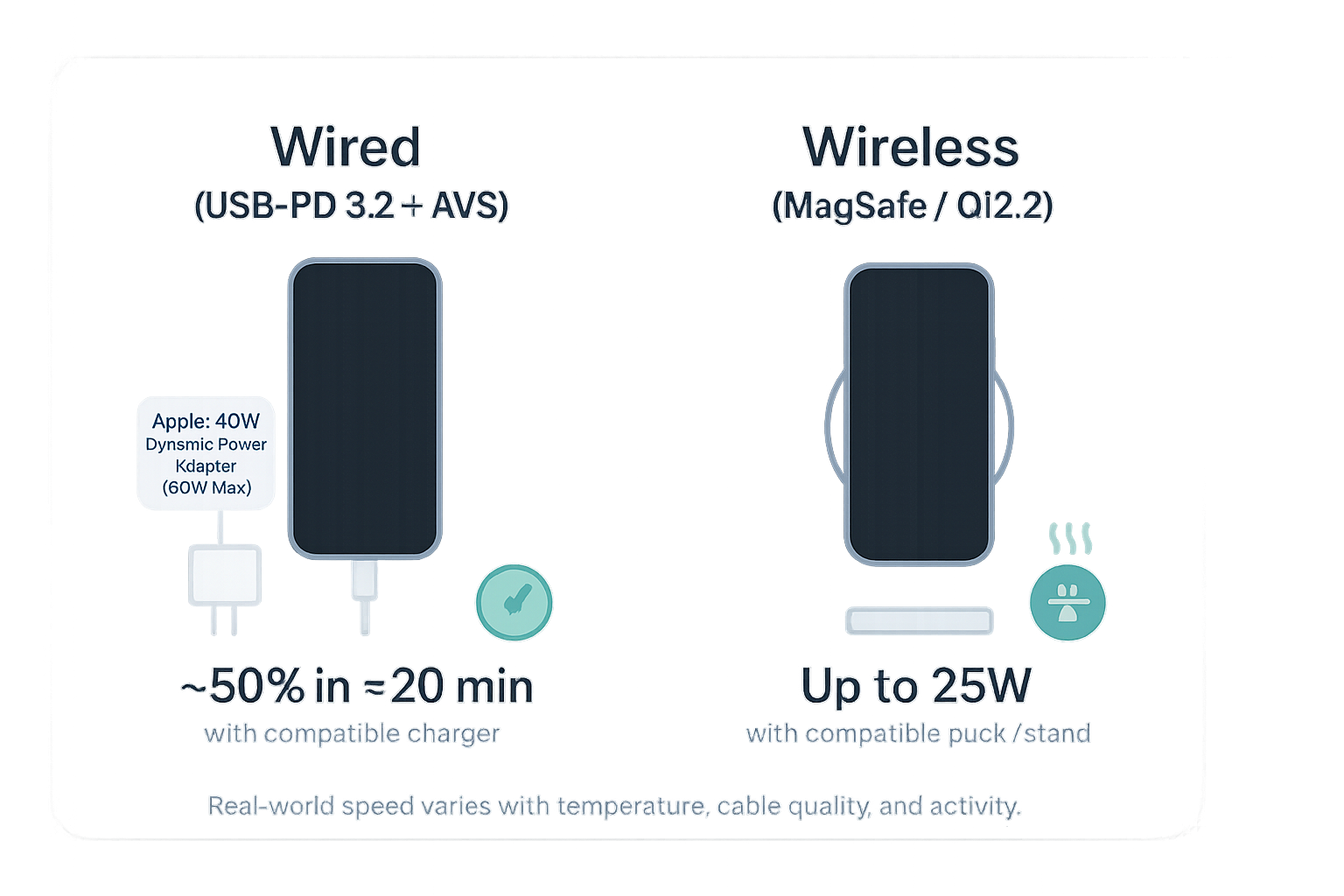
2) USB-PD 3.2 AVS — explained like you’re not an engineer
USB Power Delivery (USB-PD) is the common fast-charging standard over USB-C. Older phones took power in fixed “steps” like 5V/9V/15V. AVS (Adjustable Voltage Supply) lets the phone and charger fine-tune voltage on the fly, delivering just the right amount of power — improving speed and keeping heat under control.
3) Do you need a new charger? (What to expect by charger type)
| Charger type | What you’ll likely see | Why it matters |
|---|---|---|
| USB-C PD 20–30W (older) | ~50% in about 30 min (the “old” pace) | Works, but rarely hits the new ~20-min target |
| Laptop bricks 45–100W (older PD) | Often still ~30 min to 50% | Many don’t use AVS at iPhone-friendly ranges, so speed plateaus |
| Apple 40W “Dynamic Power Adapter (60W Max)” | About 20 min to 50% (Apple’s headline figure) | Tuned for iPhone 17 series |
| Third-party with USB-PD 3.2 + AVS | Should match Apple’s best-case class | Look for “PD 3.2” and “AVS” spelled out on the spec sheet |
| Non-certified / unbranded chargers labeled “40W” | May feel fast, or weirdly slow — results vary | Specs may be inaccurate; weaker safety; higher heat. Not recommended. |
Note: Time to 50% also depends on ambient temperature, starting battery level, and whether you’re actively using the phone.
Products with no verifiable safety certification (UL/ETL/TÜV, etc.) or no USB-IF certification ID (TID); wireless pads without Made for MagSafe or Qi2 certification; and listings from untraceable sellers/brands.
Country of manufacture does not determine safety. Many reputable brands manufacture in China and elsewhere. What matters is certification, quality control, and after-sales support.
4) If you just want an easy, safe pick
Wired (aiming for fastest)
- Top pick: Apple 40W Dynamic Power Adapter (60W Max)
- Alternative: Any reputable charger whose page explicitly states USB-PD 3.2 and AVS
- Cable: USB-C rated for 3A/60W or higher. Replace old/unknown cables.
Wireless (up to 25W)
- Choose a 25W MagSafe puck or a Qi2.2 25W pad/stand
- Older MagSafe/Qi2 will still charge, just not at the new ceiling
- For heat control, consider upright stands or models with quiet fans
5) Cable tips (boring but important)
- Baseline: a USB-C cable rated for 3A/60W. 240W (5A) also works if you already own one.
- Avoid ultra-long or ultra-thin no-name cables — they can run hotter or limit power.
- If you notice heat, flaky connections, or fraying, replace the cable. Cables are consumables.
6) How to confirm “AVS support” — and spot risky listings
| Good signs | Red flags |
|---|---|
|
|
- Search the page for “USB-PD 3.2” and “AVS”.
- Check for a USB-IF TID (certification ID) you can verify.
- Look for UL/ETL/TÜV safety marks with numbers, not just images.
- For wireless, prefer products labeled Made for MagSafe or Qi2 certified.
7) Tips for hitting 25W wirelessly
- Use a 25W MagSafe puck or a Qi2.2 25W pad/stand. Older pads usually cap lower.
- Case thickness and metal plates can slow charging. MagSafe-compatible thin cases help.
- High power creates heat. Keep the pad well-ventilated and avoid direct sun in summer.
8) Everyday safety checks
- If you notice excess heat, a burning smell, or crackling, unplug immediately.
- Avoid charging on beds/sofas where heat can build up.
- Replace damaged cables or bent connectors right away.
- Don’t leave gear in hot cars — heat degrades batteries.
9) Frequently asked questions
Will my MacBook charger give me “~20 minutes to 50%”?
It will charge fast, but older laptop bricks often don’t use AVS at the ranges the iPhone prefers, so you’ll typically see the older pace (~30 minutes to 50%). For the new fastest result, use Apple’s 40W adapter or a USB-PD 3.2 AVS charger.
If a charger says “40W,” is it automatically fast?
No. The number alone isn’t enough. Look for USB-PD 3.2 + AVS support, plus cable quality and thermal behavior. All three affect speed.
Are cheap unbranded (“non-certified”) chargers okay?
We don’t recommend them. They may work, but specs can be inaccurate and protection circuits may be weaker — raising risks of heat, battery wear, or failure. Prefer products with verifiable certification, warranty, and support.
What do I need for 25W wireless?
A 25W MagSafe puck or a Qi2.2 25W pad/stand. Check the listing for “25W,” “Qi2.2,” or “Made for MagSafe.”
10) Mini glossary
USB-PD: The fast-charging standard over USB-C.
AVS: Adjustable Voltage Supply — the charger varies voltage smoothly to deliver optimal power.
PPS: An older programmable mode commonly seen on Android; different from AVS.
USB-IF TID: A certification ID from the USB standards body. Listing it boosts trust.
Qi2 / MagSafe: Wireless charging standards. On iPhone 17, the ceiling is up to 25W with compatible gear.
Cases, screen protectors, chargers, MagSafe/Qi2 pads, cables, and more — frequently updated selections.
View on Amazon →

Comments