
“`
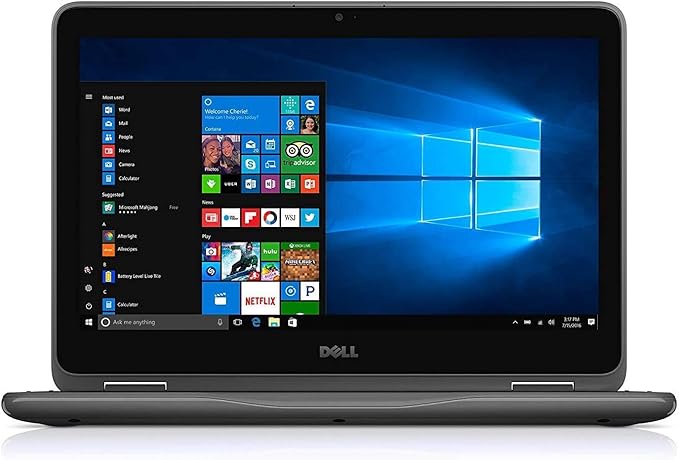
Dell Latitude 3190 2-in-1 Touch Laptop – Intel Celeron N4100, 4GB RAM, 64GB Storage, 11.6-inch Touchscreen (Renewed)
- Compact 11.6-inch touchscreen convertible designed for basic everyday computing.
- A practical budget option for schoolwork, web browsing, email, streaming, and light office tasks.
“`
If you are looking for an inexpensive Windows laptop for school, travel, web browsing, or basic office work, the Dell Latitude 3190 2-in-1 can still be an interesting option on the renewed market.
Its biggest attractions are the compact 11.6-inch touchscreen, convertible 2-in-1 design, durable education-focused construction, and low price. However, its entry-level processor, 4GB of memory, limited storage, and the unpredictable condition of refurbished batteries mean it is not the right laptop for everyone.
- Dell Latitude 3190 2-in-1 at a Glance
- What Is the Dell Latitude 3190 2-in-1?
- Performance: What Can the Latitude 3190 Handle?
- Touchscreen and 2-in-1 Design
- Portability and Build Quality
- Pros and Cons
- Important: Windows 10 vs. Windows 11
- 64GB Storage: Check What You Are Actually Getting
- Battery Life on a Renewed Latitude 3190
- What to Check When Buying a Renewed Latitude 3190
- Who Is the Dell Latitude 3190 2-in-1 Best For?
- Who Should Skip It?
- Is the Dell Latitude 3190 2-in-1 Still Worth It in 2026?
- Frequently Asked Questions
- Does the Dell Latitude 3190 2-in-1 support Windows 11?
- Is 4GB of RAM enough for the Dell Latitude 3190?
- Is the Dell Latitude 3190 good for students?
- Is the Dell Latitude 3190 good for gaming?
- Can I use the Latitude 3190 as a tablet?
- Is 64GB enough storage?
- What should I check first when a renewed Latitude 3190 arrives?
- Final Verdict
Dell Latitude 3190 2-in-1 at a Glance
| Best for | Students, travel, web browsing, email, note-taking, and basic office work |
|---|---|
| Processor | Intel Celeron N4100 quad-core, up to 2.4GHz |
| Memory | 4GB RAM on the configuration reviewed here |
| Storage | 64GB on the linked renewed configuration; verify the exact storage type with the seller |
| Display | 11.6-inch HD touchscreen, 1366 × 768 |
| Graphics | Intel UHD Graphics 600 |
| Form factor | Convertible 2-in-1 laptop |
| Best feature | Compact touchscreen design at a low renewed price |
| Main limitation | 4GB RAM and limited storage restrict heavier multitasking |
What Is the Dell Latitude 3190 2-in-1?
The Dell Latitude 3190 2-in-1 is a compact convertible laptop originally designed with education and everyday productivity in mind. Its 360-degree hinge lets you use it as a traditional laptop or fold the keyboard back for tablet-style use.
The 11.6-inch HD touchscreen keeps the computer relatively compact, while Corning Gorilla Glass adds extra protection to the display. Depending on the configuration, Dell offered the Latitude 3190 with several Intel Celeron and Pentium processors.
The renewed model discussed here is listed with an Intel Celeron N4100, 4GB of RAM, and 64GB of storage. Those specifications are adequate for lightweight computing, but they are modest by modern laptop standards.
Performance: What Can the Latitude 3190 Handle?
The Intel Celeron N4100 is a low-power quad-core processor intended for basic computing rather than demanding professional applications.
For everyday tasks such as the following, the Latitude 3190 should be reasonably capable:
- Web browsing with a moderate number of tabs
- Email and online banking
- Google Docs and Microsoft Office documents
- Online classes and school assignments
- YouTube and other streaming services
- Basic video calls
- Simple note-taking and research
The bigger limitation is the 4GB of RAM. Modern browsers and applications can consume memory quickly, so performance may slow down if you open many browser tabs or run several programs simultaneously.
For a simple Chromebook-style workload with Windows applications, however, the hardware can still be useful.
Touchscreen and 2-in-1 Design
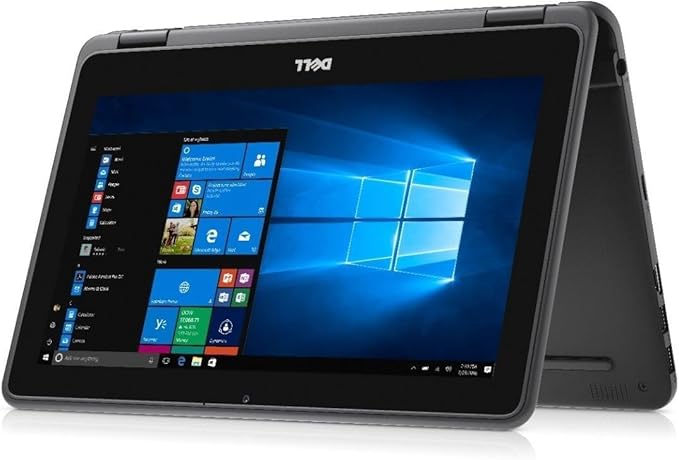
One of the strongest reasons to consider the Latitude 3190 instead of a conventional budget laptop is its 360-degree convertible touchscreen.
You can use it in standard laptop mode for typing, fold it into tent mode for watching videos, or rotate the display for tablet-style browsing and reading. That flexibility is particularly useful for students, travelers, presentations, and casual media consumption.
The 1366 × 768 resolution is basic compared with modern Full HD laptops, but it is acceptable on an 11.6-inch screen for documents, websites, and streaming.
Portability and Build Quality
The Latitude 3190 was designed as an education-oriented laptop, so practicality and durability were priorities. Its relatively small footprint makes it easy to carry in a backpack and convenient to use in tight spaces such as classrooms, airplanes, and small desks.
It is not an ultra-premium or exceptionally thin laptop, but its compact dimensions are one of its main advantages.
The touchscreen is protected by Gorilla Glass, while the overall design is intended to withstand more everyday handling than many inexpensive consumer notebooks.
Pros and Cons
Pros
- Affordable: renewed units can cost considerably less than a new Windows laptop.
- Compact: the 11.6-inch size is convenient for travel and school.
- Touchscreen: useful for browsing, reading, and touch-based applications.
- Convertible design: the 360-degree hinge provides laptop, tent, and tablet-style modes.
- Suitable for basic tasks: enough performance for documents, email, browsing, and streaming.
- Useful ports: the Latitude 3190 includes full-size HDMI and USB connectivity.
Cons
- Only 4GB of RAM: heavy multitasking can quickly become sluggish.
- Limited storage: 64GB leaves relatively little room after Windows, updates, and applications.
- Basic display resolution: 1366 × 768 is noticeably less detailed than Full HD.
- Not designed for demanding software: video editing, 3D applications, and modern gaming are poor fits.
- Renewed condition varies: battery health, cosmetic condition, keyboard feel, and accessories depend on the individual unit and refurbisher.
Important: Windows 10 vs. Windows 11
Some renewed Latitude 3190 listings still mention Windows 10 Pro. That deserves particular attention when buying this laptop today.
Windows 10 has reached the end of its normal support lifecycle, so a newly purchased computer should ideally run a currently supported operating system. Dell lists Windows 11 among the supported operating systems for the Latitude 3190 family, including configurations from this generation.
If the renewed unit arrives with Windows 10, check Windows Update and the device configuration before relying on it for everyday use. You should also confirm with the seller exactly which Windows version is installed and activated.
64GB Storage: Check What You Are Actually Getting
The linked renewed listing describes the computer as having 64GB of storage. Buyers should pay attention to the exact storage technology rather than assuming every 64GB configuration contains a conventional SSD.
Dell produced Latitude 3190 configurations using different storage options, including eMMC and M.2 solid-state storage. Because renewed listings can combine different original configurations, verify the storage type in the current seller description whenever possible.
Regardless of the storage technology, 64GB is relatively small for a Windows computer. Cloud storage, an external drive, or a large-capacity USB drive may therefore be useful if you plan to store many photos, videos, or large applications.
Battery Life on a Renewed Latitude 3190
Battery life is difficult to predict on any refurbished laptop because lithium-ion batteries lose capacity as they age.
A Latitude 3190 with a healthy battery may be perfectly adequate for short classes, meetings, or travel sessions, but you should not assume that an older renewed unit will deliver the same runtime it provided when new.
If battery life is important to you, check whether the seller specifies:
- A minimum guaranteed battery capacity
- Whether the battery has been tested
- Whether battery-related problems qualify for a return
- Whether the original or a compatible AC adapter is included
What to Check When Buying a Renewed Latitude 3190
With a refurbished computer, the condition of the individual unit can matter almost as much as the specifications. Before the return period expires, check the following:
- Battery health: make sure the computer charges correctly and does not lose power unusually quickly.
- AC adapter: verify that the included charger works reliably.
- Keyboard and touchpad: test every key and confirm that the touchpad responds correctly.
- Touchscreen: check the entire display for unresponsive areas.
- Hinges: make sure the 2-in-1 hinge moves smoothly and holds its position.
- USB and HDMI ports: test the ports you expect to use.
- Storage capacity: confirm that the advertised capacity matches Windows.
- Windows activation: confirm that Windows is properly activated.
- Seller return policy: understand how long you have to report problems.
This inspection is especially important with inexpensive renewed PCs, where the experience can vary significantly from one unit to another.
Who Is the Dell Latitude 3190 2-in-1 Best For?
The Latitude 3190 makes the most sense for people who need an inexpensive, compact computer for relatively simple tasks.
- Students who mainly use web-based learning tools and documents
- Children who need an inexpensive Windows computer for homework
- Travelers looking for a small secondary laptop
- Home users who mainly browse the web, check email, and watch videos
- Remote-access users who use the laptop primarily to connect to a more powerful PC
- Budget-conscious buyers who value price over performance
Who Should Skip It?
You will probably be happier with a newer and more powerful laptop if you regularly need any of the following:
- Heavy multitasking with many browser tabs
- Professional photo or video editing
- Modern PC gaming
- Large local storage capacity
- A large or high-resolution display
- All-day battery life with no access to a charger
- Several years of strong performance for demanding applications
In particular, users who can increase their budget may find that a refurbished laptop with 8GB of RAM and at least 128GB or 256GB of SSD storage offers a noticeably more comfortable everyday experience.
Is the Dell Latitude 3190 2-in-1 Still Worth It in 2026?
For browsing, school assignments, email, streaming, and simple office documents, it can still do the job. For demanding workloads or heavy multitasking, its Celeron processor and 4GB of memory are significant limitations.
The most important factor is therefore value. If the renewed price is low and the seller provides a reasonable return policy, the Latitude 3190 can make sense as a basic or secondary PC. If its price approaches that of newer laptops with 8GB of RAM and larger SSDs, spending more on newer hardware is usually the better long-term choice.
Frequently Asked Questions
Does the Dell Latitude 3190 2-in-1 support Windows 11?
Is 4GB of RAM enough for the Dell Latitude 3190?
Is the Dell Latitude 3190 good for students?
Is the Dell Latitude 3190 good for gaming?
Can I use the Latitude 3190 as a tablet?
Is 64GB enough storage?
What should I check first when a renewed Latitude 3190 arrives?
Final Verdict
The Dell Latitude 3190 2-in-1 is a simple, compact, and affordable renewed laptop that makes the most sense for lightweight computing.
Its touchscreen and convertible design give it an advantage over many basic budget notebooks, and the Celeron N4100 is sufficient for web browsing, documents, email, streaming, and schoolwork. At the same time, 4GB of RAM and 64GB of storage place clear limits on how much you can ask from it.
For renewed units in particular, the seller’s return policy, battery condition, installed operating system, and exact storage configuration are just as important as the model name itself.
“`
Dell Latitude 3190 2-in-1 Touch Laptop – Intel Celeron N4100, 4GB RAM, 64GB Storage, 11.6-inch Touchscreen (Renewed)
- Best suited to web browsing, schoolwork, email, streaming, and light productivity.
- Check the current price, seller details, operating system, and renewed-condition terms before purchasing.
“`
Comments