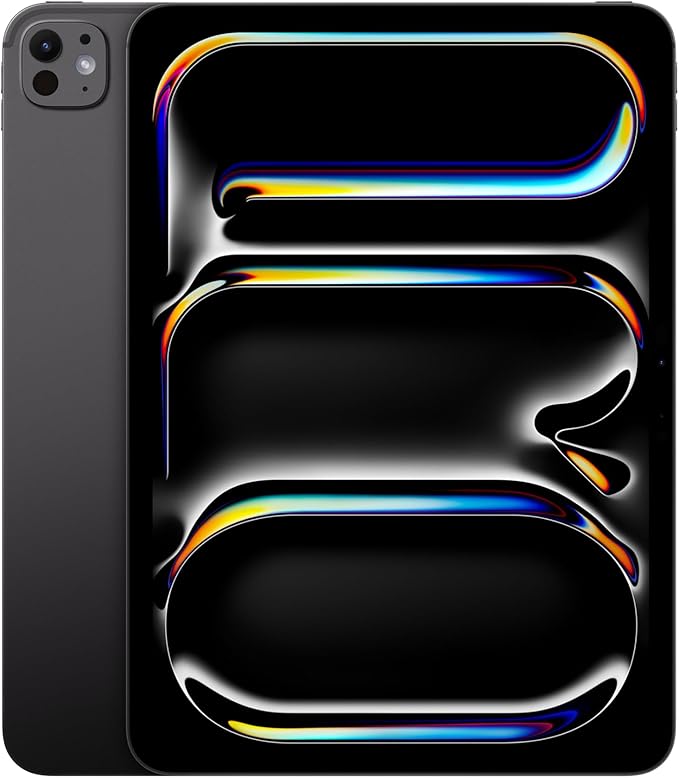
The 11-inch Apple iPad Pro with M4 is designed for people who want laptop-class performance in an extremely thin and portable tablet. With its Ultra Retina XDR display, powerful M4 chip, support for Apple Pencil Pro and Magic Keyboard, and Apple Intelligence features, it is one of the most capable iPads Apple has produced.
But is the extra performance actually worth paying for? And what about complaints involving battery life, data migration, display quality, and the limitations of iPadOS?
In this review, we take a practical look at the iPad Pro 11-inch M4’s pros, cons, common problems, performance, battery life, and ideal users to help you decide whether it is worth buying.
Quick Verdict: The iPad Pro 11-inch M4 is an outstanding choice for artists, creators, professionals, students, and demanding iPad users. Its biggest disadvantages are its premium price and the fact that iPadOS can still feel restrictive if you expect a traditional desktop operating system.

Apple iPad Pro 11-Inch (M4), 256GB, Space Black
- M4 chip with high-end performance for creative and professional workloads.
- Ultra Retina XDR display with ProMotion for smooth motion and excellent image quality.
- Supports Apple Pencil Pro and Magic Keyboard for drawing, note-taking, and productivity.
- iPad Pro 11-inch M4 at a Glance
- What Makes the iPad Pro M4 Different?
- Performance: Is the M4 Overkill?
- Display Quality: One of the Best Reasons to Buy It
- Apple Pencil Pro and Magic Keyboard
- Can the iPad Pro M4 Replace a Laptop?
- Battery Life in Everyday Use
- Common iPad Pro M4 Problems and Complaints
- Apple Intelligence on the iPad Pro M4
- Who Should Buy the iPad Pro 11-inch M4?
- Who Should Skip the iPad Pro M4?
- iPad Pro M4 vs. iPad Air: Which Should You Buy?
- Is 256GB Enough for the iPad Pro?
- iPad Pro 11-inch M4 Pros and Cons
- Is the iPad Pro 11-inch M4 Worth It?
- Frequently Asked Questions
- Is the 11-inch iPad Pro M4 good for students?
- Does the iPad Pro M4 work with Apple Pencil Pro?
- Does Apple Pencil Pro come with the iPad Pro?
- Can the iPad Pro M4 replace a MacBook?
- Are there widespread problems with the iPad Pro M4?
- Is 256GB enough for the iPad Pro?
- Is the iPad Pro M4 better than the iPad Air?
- Final Verdict
iPad Pro 11-inch M4 at a Glance
| Feature | iPad Pro 11-inch (M4) |
|---|---|
| Chip | Apple M4 |
| Display | 11-inch Ultra Retina XDR |
| Display Technology | Tandem OLED |
| Refresh Rate | ProMotion up to 120Hz |
| Storage | Starts at 256GB |
| Security | Face ID |
| Rear Camera | 12MP Wide camera |
| Other Hardware | LiDAR Scanner |
| Connectivity | Wi-Fi 6E, USB-C / Thunderbolt |
| Apple Pencil | Apple Pencil Pro supported |
| Keyboard | Magic Keyboard supported |
| Best For | Creators, professionals, students, and power users |
What Makes the iPad Pro M4 Different?
The biggest attraction of the iPad Pro M4 is its combination of performance, display quality, and portability.
The M4 chip provides enough performance for demanding creative applications, large documents, photo editing, illustration, video workflows, gaming, and multitasking. For everyday browsing and streaming, this level of performance is more than most people need. For users running professional applications, however, the additional power can make the device feel considerably more responsive and future-ready.
The Ultra Retina XDR display is another major selling point. Text looks exceptionally sharp, motion is smooth, colors are vibrant, and HDR content looks impressive. The display is particularly well suited to photo editing, digital illustration, video editing, and media consumption.
Despite its performance, the 11-inch model remains remarkably thin and lightweight. That makes it attractive to people who want professional-level hardware without carrying a conventional laptop everywhere.
Performance: Is the M4 Overkill?
For many users, the answer is yes—but that is not necessarily a disadvantage.
Basic activities such as email, Netflix, web browsing, note-taking, and document editing barely challenge the M4. Its advantage becomes more noticeable when working with heavier applications, several windows, large creative projects, high-resolution media, or AI-assisted workloads.
Creative professionals can use apps such as Adobe Photoshop, Affinity Designer, Procreate, and professional video-editing software without the experience feeling like a major compromise simply because they are working on a tablet.
Students may not require all that raw performance, but the additional headroom can be valuable for anyone planning to keep the iPad for several years.
Worth knowing: If your main activities are browsing, streaming, email, note-taking, and basic productivity, an iPad Air will usually provide better value.
Display Quality: One of the Best Reasons to Buy It
The display is arguably one of the strongest reasons to choose the iPad Pro over less expensive iPads.
Its Ultra Retina XDR display uses Tandem OLED technology to deliver excellent contrast, deep blacks, vivid colors, and strong HDR performance. ProMotion dynamically adjusts the refresh rate up to 120Hz, helping scrolling, gaming, Apple Pencil input, and general navigation feel exceptionally fluid.
Photographers, designers, illustrators, and video editors are among the users most likely to appreciate the difference.
For someone who mainly checks email, watches occasional videos, and browses the web, however, the premium display alone may be difficult to justify financially.
Apple Pencil Pro and Magic Keyboard
Accessories significantly change what the iPad Pro can do.
Apple Pencil Pro
Apple Pencil Pro turns the iPad Pro into an excellent digital notebook and creative canvas. It is particularly useful for:
- Handwritten notes
- PDF annotation
- Digital illustration
- Photo editing
- Diagrams and sketches
- Design and creative work
For students, having lecture slides, handwritten notes, research material, and PDF textbooks on a single lightweight device can be particularly convenient.
Magic Keyboard
The Magic Keyboard moves the iPad Pro much closer to a laptop-style experience. It provides a physical keyboard and trackpad while keeping the overall setup compact enough for travel, meetings, classrooms, and coffee shops.
The biggest drawback is price. Once premium accessories are added, the total cost of an iPad Pro setup can approach—or even exceed—the price of a capable MacBook.
Can the iPad Pro M4 Replace a Laptop?
Yes, for some people. For others, not completely.
If your workflow revolves around web applications, email, writing, presentations, spreadsheets, video calls, note-taking, illustration, photo editing, and iPad-optimized creative apps, the iPad Pro can work surprisingly well as a primary computer.
External display support and keyboard-and-trackpad accessories also make desktop-style workflows much more practical than they were on older iPads.
The main limitation is usually not performance. The M4 has plenty of computing power.
The main limitation is iPadOS.
Some workflows involving advanced file management, specialized desktop applications, development environments, legacy software, or complex multi-window arrangements may still be easier on macOS or Windows.
Bottom line: The iPad Pro can replace a laptop if the software you depend on works well within the iPad ecosystem. Powerful hardware alone does not guarantee that every desktop workflow will translate perfectly to iPadOS.
Battery Life in Everyday Use
Battery life varies considerably depending on how you use the device.
Web browsing, document editing, reading, and streaming are relatively light workloads. Video editing, gaming, high screen brightness, HDR content, external displays, intensive creative applications, and constant background syncing can consume significantly more power.
Some owners can comfortably make it through a normal working day, while heavier users may need to charge more frequently.
Rather than treating “all-day battery life” as a guarantee for every workload, it is better to think of the iPad Pro as an extremely thin performance device whose battery life depends heavily on brightness, applications, network use, and workload.
Common iPad Pro M4 Problems and Complaints
Most complaints do not point to one clearly established widespread hardware defect. Instead, reports tend to fall into several separate categories.
1. Data Migration Problems
Some users have reported problems when transferring data from an older device, particularly files stored inside third-party applications.
The safest approach is simple: do not erase your old iPad until you have confirmed that important files, photos, app data, and documents transferred successfully.
Keeping an additional iCloud or local backup before migration is also a sensible precaution.
2. Display Color or Tint Complaints
A small number of users have reported unusual display colors or an unwanted tint.
Keep in mind that display appearance can also be affected by settings such as True Tone, Night Shift, accessibility options, brightness, and surrounding lighting.
If a new iPad shows an obvious display problem that remains after basic troubleshooting, using the retailer’s return window or contacting Apple Support is usually preferable to accepting a potentially defective unit.
3. iPadOS and File Management Limitations
Some power users find Apple’s Files app and the overall iPadOS workflow less flexible than Finder on macOS or File Explorer on Windows.
This distinction matters because it is not necessarily a hardware problem.
Anyone moving from a conventional laptop should check whether their essential applications and file-management workflows are available on iPadOS before buying the device as a complete laptop replacement.
4. Seller and Fulfillment Issues
Marketplace purchases can occasionally introduce problems unrelated to the iPad itself, including damaged packaging, missing accessories, incorrect models, or products that appear to have been previously opened.
For an expensive device such as the iPad Pro, purchasing from Apple or a reputable retailer and checking the seller’s return policy can reduce unnecessary risk.
Apple Intelligence on the iPad Pro M4
The M4 iPad Pro supports Apple Intelligence features available on compatible versions of iPadOS.
Depending on software version, language, and region, available capabilities can include Writing Tools for proofreading, rewriting, and summarizing text, improvements to Siri, and intelligent functionality within supported Apple apps.
Apple Intelligence is a useful addition, but it should not necessarily be the main reason to buy this iPad.
The more immediate reasons to choose the iPad Pro remain its display quality, performance, portability, and accessory ecosystem.
Who Should Buy the iPad Pro 11-inch M4?
The 11-inch iPad Pro makes the most sense for buyers who can genuinely benefit from high performance in a compact form factor.
Digital Artists and Designers
The combination of the Ultra Retina XDR display and Apple Pencil Pro makes the iPad Pro particularly appealing for illustration, design, photo editing, and other visual work.
Content Creators
Photographers and video creators gain a highly portable display along with enough processing power for demanding editing workflows.
Students
Students can use the iPad Pro for handwritten notes, PDF annotation, research, presentations, multitasking, diagrams, and creative coursework.
However, students with more basic requirements should also compare it carefully with the iPad Air before spending the additional money.
Business Travelers and Hybrid Workers
The thin, lightweight design makes the 11-inch model easy to carry between meetings, offices, airports, and hotels. Paired with a Magic Keyboard, it can handle email, presentations, spreadsheets, web applications, and video calls in a compact package.
Who Should Skip the iPad Pro M4?
The iPad Pro is probably unnecessary if your main activities are:
- Web browsing
- Social media
- Netflix and YouTube
- E-book reading
- Basic note-taking
- Light gaming
An iPad Air or standard iPad can handle these activities at a significantly lower cost.
You should also think carefully before purchasing an iPad Pro as a MacBook replacement if your work depends heavily on desktop-only software, advanced file management, programming environments, specialized business applications, or numerous external peripherals.
The hardware may be powerful enough, but your software workflow ultimately determines whether the switch makes sense.
iPad Pro M4 vs. iPad Air: Which Should You Buy?
| iPad Pro M4 | iPad Air | |
|---|---|---|
| Best For | Professionals and power users | Most mainstream users |
| Display | Premium Ultra Retina XDR | Excellent, but less advanced |
| 120Hz ProMotion | Yes | No |
| Performance | Higher | More than enough for most users |
| Value | Best for demanding workloads | Better for most buyers |
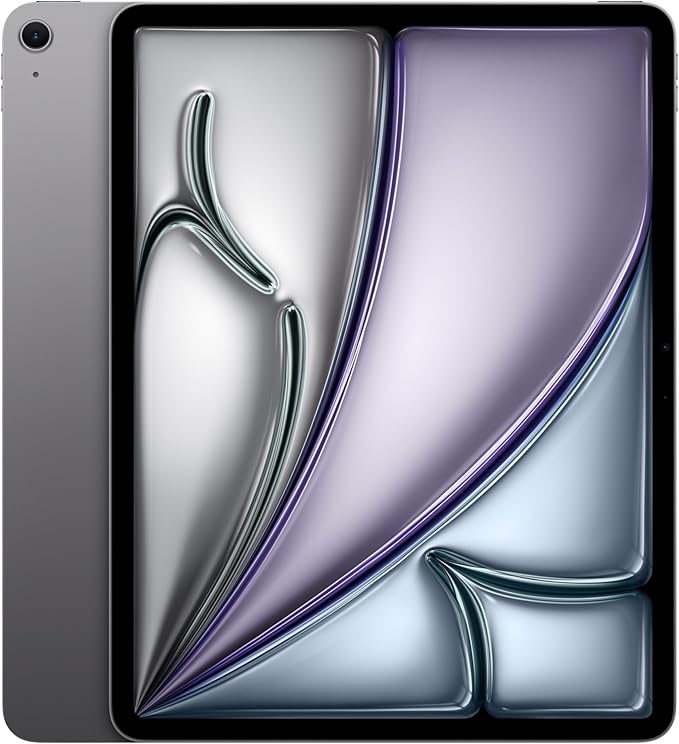
For most mainstream buyers, the iPad Air offers better value.
The iPad Pro becomes more compelling when you specifically value the premium display, ProMotion, thinner design, higher-end performance, or professional creative capabilities.
Simple recommendation: Choose the iPad Air if value matters most. Choose the iPad Pro if its superior display and professional capabilities are important enough to justify the premium.
Is 256GB Enough for the iPad Pro?
For many buyers, 256GB is a practical starting capacity.
It should be comfortable for productivity applications, note-taking, documents, streaming, moderate photo libraries, and general everyday use.
However, creators working with large RAW photo libraries, high-resolution video, or large project files should consider additional internal storage or plan to use external and cloud storage.
More internal storage is convenient, but Apple’s higher-capacity configurations can increase the purchase price significantly.
iPad Pro 11-inch M4 Pros and Cons
| Pros | Cons |
|---|---|
| Extremely powerful M4 chip | Premium price |
| Excellent Ultra Retina XDR display | Accessories increase the total cost |
| Thin and lightweight design | iPadOS may limit some desktop workflows |
| Excellent Apple Pencil Pro experience | Overkill for basic tablet use |
| Strong creative-app ecosystem | Not a complete MacBook replacement for everyone |
| Good long-term performance potential | Higher storage configurations become expensive |
Is the iPad Pro 11-inch M4 Worth It?
Yes—if you are the right kind of buyer.
The iPad Pro M4 is worth considering if you want one of Apple’s most powerful portable computing experiences and expect to benefit from its premium display, performance, Apple Pencil support, or professional applications.
It becomes much harder to justify if your requirements are basic.
The important question is not whether the iPad Pro has enough power. It clearly does.
The better question is whether your workflow benefits enough from that performance and premium display to justify paying more than you would for an iPad Air or conventional laptop.
Frequently Asked Questions
Is the 11-inch iPad Pro M4 good for students?
Yes. The iPad Pro M4 is excellent for handwritten notes, PDF annotation, research, multitasking, creative projects, and presentations. However, students who do not need its premium display or extra performance may get better value from an iPad Air.
Does the iPad Pro M4 work with Apple Pencil Pro?
Yes. The M4-generation iPad Pro supports Apple Pencil Pro, making it particularly attractive for artists, designers, students, and handwritten note-takers.
Does Apple Pencil Pro come with the iPad Pro?
No. Apple Pencil Pro is sold separately. Its cost should therefore be included when comparing the total price of an iPad Pro setup with other tablets or laptops.
Can the iPad Pro M4 replace a MacBook?
It can replace a MacBook for workflows based around compatible iPad apps, web applications, writing, communication, illustration, note-taking, and media editing. A MacBook remains more practical for some desktop-specific applications, programming workflows, and advanced file management.
Are there widespread problems with the iPad Pro M4?
There is no single problem discussed here that suggests every M4 iPad Pro is affected by a widespread hardware defect. Reported complaints tend to involve individual display issues, migration problems, software limitations, or retailer fulfillment problems.
Is 256GB enough for the iPad Pro?
For general productivity, studying, streaming, note-taking, and moderate creative work, 256GB should be sufficient for many people. Video professionals and users with very large media libraries may benefit from more storage or external storage options.
Is the iPad Pro M4 better than the iPad Air?
The iPad Pro is technically more capable, especially in display technology and high-end performance. However, the iPad Air is often the better value for people who do not need the Pro model’s premium features.
Final Verdict
The Apple iPad Pro 11-inch M4 is an exceptionally capable tablet, but whether it represents good value depends heavily on how you intend to use it.
Its strongest qualities are easy to identify: excellent performance, a premium display, impressive portability, Apple Pencil Pro support, and access to an increasingly capable iPadOS ecosystem.
Its weaknesses are equally important. The price rises quickly once accessories are added, and iPadOS still cannot reproduce every desktop workflow.
For digital artists, content creators, professionals, serious students, and experienced iPad users who know exactly why they need the Pro features, the iPad Pro M4 can be an outstanding purchase.
For casual users, the iPad Air will usually be the more sensible option.
Our Verdict: Buy the iPad Pro 11-inch M4 for its exceptional display, portability, creative tools, and high-end performance—not simply because it is the most powerful iPad.
Apple iPad Pro 11-Inch (M4), 256GB, Space Black
- Powerful M4 performance in a thin and highly portable design.
- Premium Ultra Retina XDR display with ProMotion.
- A strong choice for creators, students, professionals, and power users.
Comments